If you want to do this yourself go here to Start Your Own 100-Day Challenge →
Building the Landing Page
Yesterday I validated the problem and defined the product. Today I ship a working landing page.
The plan says build the landing page with Stripe checkout. Get it live. Test it. Done.
Let’s see how close I can stick to that.
Generating the Spec
I went back to my ChatGPT conversation from yesterday and ran the spec generation prompt.
Based on the landing page copy from yesterday, write a complete spec for building my landing page. Include: (1) Page Structure: all sections from the copy (hero, problem, solution, how it works, pricing, CTA), (2) Design Requirements: clean, modern, mobile-responsive, fast loading, single page with no navigation, clear visual hierarchy with headline as hero, (3) Tech Stack: SvelteKit, (4) Stripe Integration: when user clicks CTA button, create Stripe checkout session with product name and price from the copy, redirect to Stripe hosted checkout (don’t build custom payment form), on success redirect to “Thank you - check your email” page, on cancel redirect back to landing page, set up in test mode for testing with Stripe test cards, (5) Deployment: instructions for deploying to Vercel, (6) Success Criteria: page loads in under 2 seconds on mobile, CTA button is obvious and works, can complete test purchase with Stripe test card 4242 4242 4242 4242. Use the exact copy from yesterday - don’t change the wording. Make this tactical enough that I can hand it to my coding AI and it builds the complete page with working Stripe checkout.
Summary: Complete spec generated with page structure, design requirements, SvelteKit tech stack, Stripe integration flow, Vercel deployment, and success criteria. Everything tactical and ready to hand off.
View full response
The AI provided a complete technical specification covering:
Page Structure: Hero section with headline and CTA, problem section with customer pain points, solution explanation, how-it-works breakdown, pricing with single plan, and final CTA.
Design Requirements: Clean, modern aesthetic. Mobile-first responsive. Single page with no navigation. Clear visual hierarchy with headline dominating the hero.
Tech Stack: SvelteKit with Tailwind CSS. Static adapter for fast loading.
Stripe Integration: CTA button triggers checkout session creation. Redirect to Stripe hosted checkout (no custom payment form). Success redirect to thank-you page. Cancel redirect back to landing page. Test mode enabled.
Deployment: Vercel with environment variables for Stripe keys.
Success Criteria: Page loads under 2 seconds on mobile. CTA is obvious and functional. Test purchase works with Stripe test card 4242 4242 4242 4242.
Except one thing.
The pitch was wrong.
The Pitch Problem
The AI gave me product-aware copy. “Here’s what we do, here’s how it works, here’s the price.”
That’s not who my customer is.
My customer doesn’t know they have an awareness stage mismatch. They just know their page isn’t converting and they don’t know why.
They’re problem aware, maybe early solution aware. They’re not ready for a product pitch yet.
This is exactly the problem Brandivize is supposed to solve. And the AI just made the mistake on my own product.
I caught it immediately.
Writing the Real Pitch
I didn’t fix the prompt. I went to work writing the right copy by hand.
The headline needs to call out their felt experience, not explain my solution.
Not: “We diagnose awareness stage mismatch”
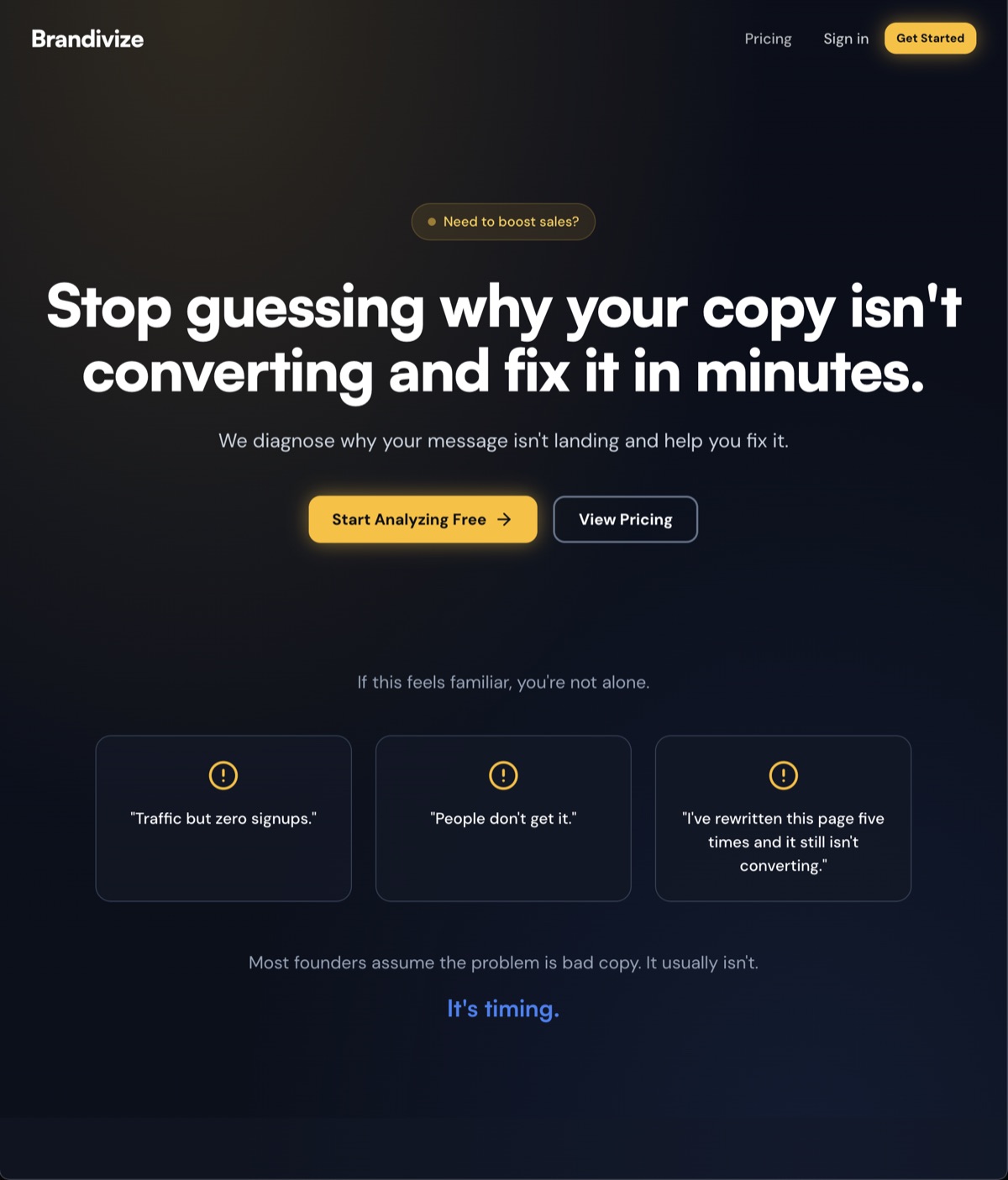
But: “Stop guessing why your copy isn’t converting”
They don’t care about awareness stages yet. They care about the conversion problem.
Once I have their attention, THEN I can introduce the mechanism.
I rewrote the hero, problem section, and solution using Schwartz principles. Problem aware → solution aware bridge. No product pitch until they understand what’s actually broken.
Building Everything
I opened Claude Code and started building.
Stack: SvelteKit, Tailwind, deployed to Vercel.
I used multiple Claude Code agents running in parallel. One for the frontend structure, one for styling, one for the auth system.
Wait, auth system?
Yeah. I pivoted from Stripe checkout to user registration.
Here’s why: I need to capture emails and give people access to the tool. A Stripe checkout makes sense when you’re selling a finished product. Right now I’m validating demand and building the actual diagnostic tool.
Registration gets me the same signal (do people want this enough to sign up?) without forcing them to pay before I’ve proven value.
I can add Stripe later once the tool works.
What Got Built
In four hours I shipped:
- Complete landing page at brandivize.com
- Hero with the right pitch
- Problem section using customer language from Day 1 research
- Solution explanation
- Feature breakdown (Stage Detection, Five Rewrites, Message Framework)
- Full explanation of the 5 awareness stages
- About section
- FAQ section
- Auth system (register/login pages)
- Footer with legal pages
- Mobile responsive
- Fast load times
Everything is live. Everything works.
Here’s how it looks:
Testing the Page
I opened it on my phone. Loaded fast. Copy is clear. CTA button works.
Sent it to a few founders. Two of them immediately asked “when can I use this?”
That’s the signal I needed. Not “cool idea” but “when can I access it?”
What I Learned
AI is great at structure and speed. But it can’t diagnose awareness stage mismatch in copy. That’s still a human skill.
Which is exactly why Brandivize needs to exist.
The irony is not lost on me.
Day 2 Done
Four hours. Live landing page. Working auth. Clear positioning.
Tomorrow I start building the actual product, but just an MVP that meets the promise of the landing page… nothing more no matter how “cool” it would be. Just the diagnostic engine that detects awareness stage and the AI engine and sophisticated copywriting prompts to generate the five rewrites based on the stages of awareness.
Let’s see if that can be done in one day. Maybe, maybe not. Tomorrow will be fun!
Here’s our new baby! brandivize.com Now grow up a little and go get product market fit!
Written by
Alma Tuck
More Build in Public Updates
Day 6 of Building in Public
Full Stripe integration complete. Email sequences built. Product Hunt launch prep underway.
Day 5 of Building in Public
Back to building. Refined the AI prompts, built billing logic, and set up email infrastructure.
Day 4 of Building in Public
Christmas Day. Taking a break to celebrate with family.